
Features > Account Management > User Manager
Cerberus FTP Server
User Manager
Cerberus FTP Server can help administrators manage user accounts from three different sources.
Native User Accounts
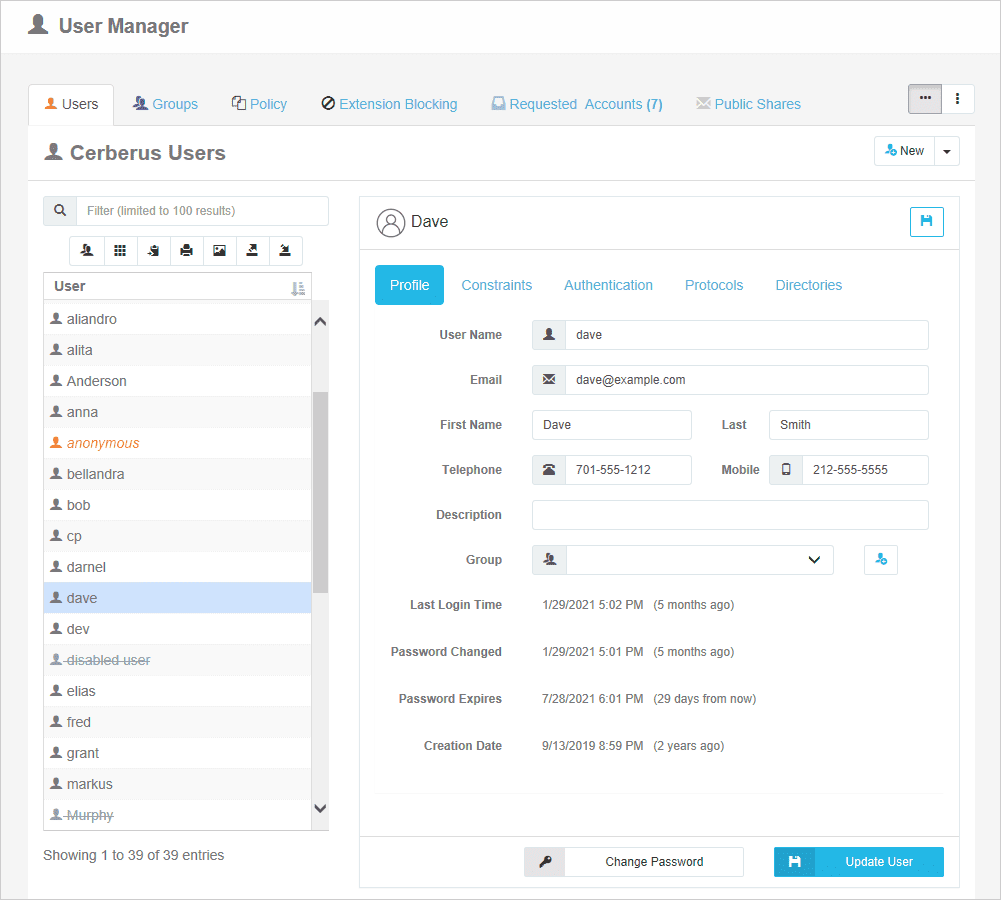
The default Cerberus FTP Server user database, also referred to as Cerberus native user accounts, is displayed in the User List box on the Users page of the User Manager. With Cerberus native user accounts created just for Cerberus FTP Server, administrators can manage them through the Cerberus desktop admin console or through web administration.

Active Directory User Accounts

LDAP User Account Directory
Active Directory User Accounts
Cerberus FTP Server can be used to authenticate Active Directory users when the machine hosting Cerberus is part of a domain (or the local NT account database), even if the computer Cerberus FTP Server is installed on is not the domain controller. See the page Active Directory Authentication for more information on how to configure Cerberus to allow authentication of Active Directory domain users.
LDAP User Account Sources
Users can also be authenticated against an LDAP service. See the section on configuring Cerberus for LDAP authentication for more information.
NOTE: Active Directory and LDAP authentication are only available in the Professional and Enterprise editions of Cerberus FTP Server.
User Manager Resources
Try Cerberus FTP Server free for 25 days
- Live US-based phone & email support
- Bulletproof reliability
- Built for complete data control
- Trouble-free enterprise deployment
Full Cerberus FTP Server Feature List

Protocols
FTP, FTP/S, SFTP, SCP, HTTP/S

Advanced Security
SSH, SSL, FIPS 140-3

MFT Automation
Event, Alert & Sync Tools

Environments
Windows Server, Cloud & Virtual

Access Protection
IP, User & Protocol Restriction Tools

Account Management
AD, LDAP, 2FA, SSO & More

Auditing and Reporting
File Access, User and Admin Logging

Administration Tools
API, Sync Manager, & Other Tools

HTTPS Web Portal
Browser-Based Transfer from Any Device

Monitoring & Testing
Automated Network, Load and Access Testing

Regulatory Compliance
Auditing, Retention, & Encryption Tools
Award-Winning Support
Phone, Email, & 24/7/365
Industry-Focused Solutions
Cerberus FTP Server supports a wide range of industry and professional needs. Enhance data security, streamline operations, and ensure compliance with regulations.


Uncompromising Commitment To Customer Satisfaction

G2

4.8 / 5

Capterra
4.8 / 5

CNET Download
4.8 / 5
Recognized as an industry-leading secure FTP server








Trusted by Companies Like Yours
Uncompromising Customer Satisfaction

James Fayson
IT Service Owner, Duke Health Technology Solutions
Our users have found Cerberus to be straightforward. We have handled many service tickets over the past three years, and Cerberus has had the least number of issues, by far.

Jake Cloward
Support Manager, Companion Corporation
We’ve been using Cerberus for at least five years, and it’s been awesome. Everything’s been very simple and easy, and we haven’t come across any limitations. It always just seems to work.






Latest News
Disaster Recovery and High Availability for File-Transfer Systems
Key Takeaways File-transfer systems have become mission-critical infrastructure, yet many organizations lack a documented or tested disaster recovery plan. A resilient environment requires backups, redundancy, configuration replication, controlled failover procedures,...
Using File-Transfer Logs and Audit Trails to Improve Security and Operations
Key Takeaways Most organizations generate file-transfer logs but rarely use them to their full potential for security, troubleshooting, or compliance. Detailed logging and audit trails help identify unauthorized access, failed transfers, misconfigurations, and...
How to Replace Batch Transfer with MFT Automation
Key Takeaways Organizations are moving beyond scheduled SFTP and FTPS transfers because modern workflows require faster, event-driven data movement. Event-driven MFT automation triggers transfers based on real-time system activity, improving responsiveness and...
Explore what Cerberus FTP Server can do for you
- 25 Day Free Trial
- No Credit Card Required
- Up and running in less than 15 mins