
Features > Administration Tools > Web Administration
Cerberus FTP Server
Web Administration
Easily Configure Remote Settings
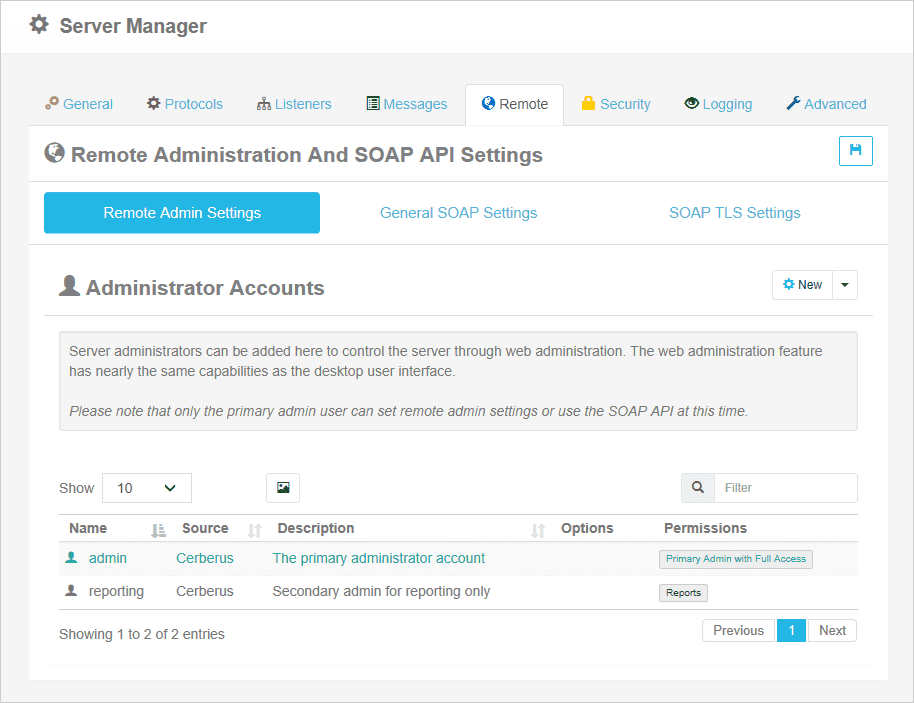
Cerberus FTP Server’s remote settings page allows the administrator to easily configure web administration access, and remote Application Programming Interface (API) access to Cerberus FTP Server. With easy accessibility, server administrators only need a web browser, or through the desktop Cerberus FTP Server Graphical User Interface (GUI) when logged into the server.
Cerberus exposes several APIs for controlling all aspects of the server using SOAP web services for software developers. Primary admin usernames and passwords are also used for basic authentication when using the SOAP web services API to access the server.
The administrator can also control the server through web administration. The web administration feature has nearly the same capabilities as the desktop user interface. Most server functions can be controlled through web administration. We will be adding more features with every minor release until web administration mirrors the local graphical user interface. To learn more, click here.

Custom Setting Configuration

SOAP API
Web Administration Resources
Try Cerberus FTP Server free for 25 days
- Live US-based phone & email support
- Bulletproof reliability
- Built for complete data control
- Trouble-free enterprise deployment
Full Cerberus FTP Server Feature List

Protocols
FTP, FTP/S, SFTP, SCP, HTTP/S

Advanced Security
SSH, SSL, FIPS 140-3

MFT Automation
Event, Alert & Sync Tools

Environments
Windows Server, Cloud & Virtual

Access Protection
IP, User & Protocol Restriction Tools

Account Management
AD, LDAP, 2FA, SSO & More

Auditing and Reporting
File Access, User and Admin Logging

Administration Tools
API, Sync Manager, & Other Tools

HTTPS Web Portal
Browser-Based Transfer from Any Device

Monitoring & Testing
Automated Network, Load and Access Testing

Regulatory Compliance
Auditing, Retention, & Encryption Tools
Award-Winning Support
Phone, Email, & 24/7/365
Industry-Focused Solutions
Cerberus FTP Server supports a wide range of industry and professional needs. Enhance data security, streamline operations, and ensure compliance with regulations.


Uncompromising Commitment To Customer Satisfaction

G2

4.8 / 5

Capterra
4.8 / 5

CNET Download
4.8 / 5
Recognized as an industry-leading secure FTP server








Trusted by Companies Like Yours
Uncompromising Customer Satisfaction

James Fayson
IT Service Owner, Duke Health Technology Solutions
Our users have found Cerberus to be straightforward. We have handled many service tickets over the past three years, and Cerberus has had the least number of issues, by far.

Jake Cloward
Support Manager, Companion Corporation
We’ve been using Cerberus for at least five years, and it’s been awesome. Everything’s been very simple and easy, and we haven’t come across any limitations. It always just seems to work.






Latest News

Cerberus FTP Server by Redwood version 2026.4: Automated SSL/TLS certificate management, tighter security controls and more
Cerberus by Redwood version 2026.4 helps you keep your environment secure and up to date with less manual effort, from automating certificate renewals to scripting user and group mapping. What’s new? Automated SSL/TLS certificate management with Let’s Encrypt You can...
NYDFS MFA requirements: Closing the file transfer access gap
Key takeaways Since November 1, 2025, the New York Department of Financial Services (NYDFS) has required multi-factor authentication (MFA) for any individual accessing any information system of a covered entity, under 23 NYCRR 500.12. File transfer is a common gap...
OpenSSL 3.0 has reached end of life: Is your file transfer environment accounted for?
Key takeaways OpenSSL 3.0 reached end of life on September 7, 2026, and no longer receives public security fixes. OpenSSL 3.5 is a long-term support release with public support through April 8, 2030. On September 29, 2026, OpenSSL published fixes for 14...
Explore what Cerberus FTP Server can do for you
- 25 Day Free Trial
- No Credit Card Required
- Up and running in less than 15 mins